Connecting a mini host and monitor is very simple, here are the detailed steps:
1、 Choose the correct interface
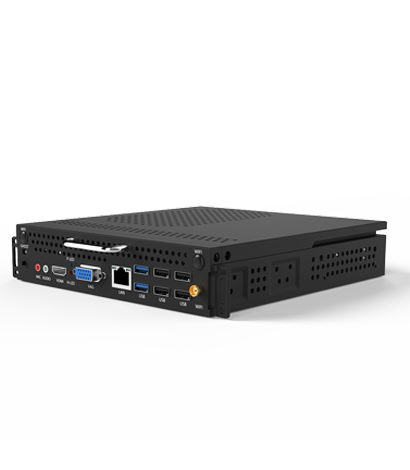
Mini consoles usually use HD, VGA, DP and other interfaces to connect to displays. It is important to ensure that the interface you choose matches the interface of the display, so that the two can communicate with each other through correct wiring, in order to ensure normal communication and display effects between them.
2、 Connection method
1. HD interface connection
Insert one end of the HD cable into the HD interface of the monitor and the other end into the HD interface of the mini host, then plug in the power cord and start the mini host.
2. VGA interface connection
Insert one end of the VGA cable into the VGA port of the monitor and the other end into the VGA port of the mini host. Since VGA only transmits video signals, if audio is needed, the audio cable needs to be connected to the audio interface of the monitor and the host.
3. DP interface connection
Insert one end of the DP cable into the DP interface of the monitor and the other end into the DP interface of the mini host.
3、 Solving common problems
1. What should I do if there is no signal on the monitor?
If the monitor cannot connect to the mini host, first make sure that the host is turned on, and then check if the connection cable is properly plugged in and in good contact.
2. What should I do if there is an abnormality displayed after connecting?
If the displayed image is not normal, it may be due to wiring errors or incompatible display resolution. You can try replacing the connection cable or adjusting the display resolution to solve the problem.
3. How to switch input display sources?
If multiple devices are connected to the monitor, it is necessary to switch input sources. It can be achieved through the display menu settings or by pressing the specified input source switch key (such as "input", "source" and other names).
Through the above steps, you can easily connect the mini host and monitor, and enjoy high-definition display effects. If you encounter any problems, please follow the above methods to gradually troubleshoot.